
If you’ve ever woken up in the middle of a project delivery-phase and thought “What even am I to do today?”, you have encountered a “bug in the code”, a sly, time-eating experience that most—if not all—nonprofit leaders and project managers have encountered. Yet, the nonprofit professionals who are known for delivering projects efficiently are those who manage to step beyond their initial attraction to “going with the flow” to commit to goal mapping, routine, progress review, technique review and daily oversight.
Time for nonprofits is finite. Day-to-day operations, outreaches, grant application windows, pitches and sponsor presentations, and partner follow-up are all time bound. Desolutory leadership costs nonprofits dearly: volunteer motivation runs low, partnership opportunities stay stuck in the intent stage, media campaigns are produced haphazardly and so miss their mark, opportunities to earn financial and capital resources are missed, and the impactful projects founders design to achieve the Global Goals are never implemented.
Only a handful of nonprofit professionals have mastered the crucial skill of time management. In fact, some development professionals remark that very few nonprofit managers maximize their daily routine as much as they should be doing. Hence, nonprofit leaders who will be efficient must refuse to rely entirely on improvisation. They must learn to design and document a day-to-day workflow that makes achieving operational efficiency and productivity easy & repeatable.
Thankfully, this is a practical guide to improving your day-to-day workflow and managing your time as a nonprofit founder.
My name is Ugo Anna Ude. Between 2020 and 2024, I led The Book Drive Bayelsa, a book donation project that delivered ~200 books yearly to reading programs, community and small school libraries in the Niger Delta of Nigeria. In 2024, I co-led the first phase of a science-and-vocational-library-building project in the heart of Yenagoa, Bayelsa State. Quite sadly (but thankfully for you, dear reader), I started out my activism journey passionate but confused about strategy, volunteer management and time management. Thankfully (for both you and me), between 2023 and 2025, I paused operations at the Drive to embark on a two-year fellowship where I interrogated the systems and mindsets that kept intergenerational activists efficient.
In this guide, I share with you practical steps and lessons that improve my day-to-day workflow. They build on ideas and reference tools you may know but might have not harnessed. I hope you find my lessons witty, timely and customisable.
Lesson 1: Start Every Year or Project Season with an Organizational Calendar
Take a moment to imagine a secondary school without an academic calendar. Students troop into their classes by noon. The Biology teacher teaches a great lesson this Monday but is sure to not be seen for another month, and interhouse sports events happen in the middle of the examination season. Such inconceivable levels of chaos will result in a drop in the school’s rating and poor academic performance across grades. Yet, this is how many founders start—and continue—their leadership journeys.
Nonprofits fly by the seat of their pants when founders miss the crucial step of designing a yearly/project calendar. Drafting a calendar complete with project milestones, key dates and deliverables ahead of a project year keeps you and your volunteers on track, ensures daily progress, and allows for easy evaluation and adjustments.
To begin drafting your nonprofits calendar, you may:
- Ask or note down what your main goals are across communications, programming and operations. Do you wish to conduct two outreaches, a media campaign or a building project?
- Envision the major steps that might lead up to achieving those goals. A building project might need a fundraising campaign or event. A youth conference will begin with a pre-planning stage that features theme setting, budgeting, partner prospecting, fundraising, speaker procurement and publicity and marketing.
- Further imagine the previous steps as monthly, weekly and daily deliverables, events and tasks. For instance, budgeting for a conference includes numerous tasks such as concept note drafting, identifying possible costs, conducting a market survey, contacting vendors and creating a spreadsheet.
- Having determined your end goal(s), major steps and smaller tasks, realistically set dates to them. Allow for flexibility by including buffer periods that account for unforeseen delays.
Lesson 2: Use a Project Timeline Visualiser to Stay on Track
Like a wedding dress delivered a day after the marriage ceremony, organizational calendars are of no use to founders and teams if said documents are kept away in Google Docs or in a Notion workspace. I’ve found that project boards (vision boards, timelines and moodboards) affect my volunteers, partners and me with a sense of urgency when they are represented in visual formats and constantly referred to.
To create a project visualiser, use one of the project management world’s most useful but best kept secrets—the Gantt Chart. A Gantt Chart is a colour-coded visualiser of your project deadlines and task overviews. It uses horizontal bars to represent how long a task runs for, allowing you to immediately spot busy periods in your calendar and what tasks are dependent on others.
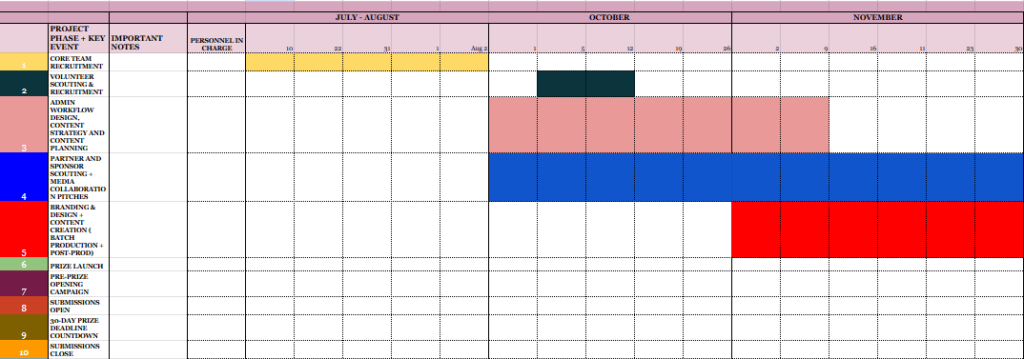
Pro tip: Screengrab or print a copy of your Gantt Chart and pin it to your staff groups, Slack channels or office boards.
Resources: Find a Gantt Chart template I created for you here. If you favour Canva, here are customizable templates for you.
Lesson 3: Do the Deep Work of Organising Information Before ‘The Work’ Begins
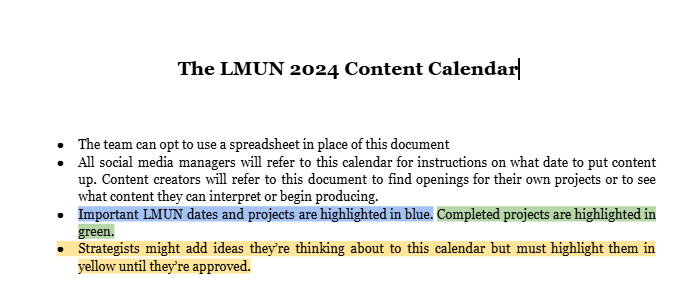
In an essay I published after my year as Head of Media at the Lagos Model United Nations 2024 Conference, I write about preparing to lead 26 staff as a mother picks out her children’s Christmas clothes. Moyosola Olowokure who was my co-lead and I conducted numerous decision-making sessions before we onboarded staff members onto the team. We spent weeks creating a comprehensive guide that listed the names of all staff, their roles and their team responsibilities; we organised links to all important resources and answered the top 10 questions we imagined staff might ask about their roles on a daily basis. Two months after the official onboarding, staff were referring to the document and organizing their own output without seeking us team heads first. Moyosola and I could agree that we had saved time by cutting out unnecessary and repetitive enquiries.
According to a McKinsey study, employees in corporations spend 1.8 hours every day searching for information. That’s 25% of an 8-hour work day spent making enquiries and information. If founders are to improve their day-to-day workflow, they must simplify and organize information and save time by cutting out repetitive enquiries.
Lesson 4: Automate Repetitive Tasks
With my previous experience in publishing and film, I learned to do nearly everything by hand. Editing, proofreading, transcribing, sending reminders etc. And so, as a nonprofit founder, I was immediately skeptical about the use of Artificial Intelligence in delivering the same administrative tasks I had learned to do manually. Five years later, I’ve learned to use common softwares and AI assistants to automate repetitive tasks that reduce my speed and productivity. (I still do not advocate for the use of generative AI tools in creating content or stories for nonprofits.)
To improve my day-to-day workflow, I’ve expanded my knowledge of digital workspace tools. I use Google Calendar’s ‘Appointment Feature’ to take my calls (and that is a cheap & easy-to-use alternative to Calendly.) Gemini’s free notetaker listens in on my meetings and sends me minutes & a to-do list. Grammarly and Google Docs’ spellcheck features hint at grammatical and mechanical errors in my proposals and notes. As an alternative to Notion’s to-do-list, the “Reminder” widget on my IPhone homescreen keeps me reminded of tasks throughout the day. I immediately schedule all recurring meetings, tasks and events to Google Calendar with 30, 10 and 5 minute reminders. These tools save me time, and I imagine they can do the same for you.
Lesson 5: Create, Buy or Use Available Templates
In harnessing templates for document creation, founders increase their day-to-day efficiency. Creating or buying and adapting your templates saves you and your team time, improves accuracy and ensures that your branding and formatting stay consistent. Some templates worth investing in include concept note templates, project proposal templates, report templates, Standard-of-Procedure document template, photography consent release form templates, and contact books.
Lesson 6: Use Opportunity Finders to Cut Time Spent Grant Prospecting
The tip is clear: nonprofits spend a significant amount of their month (between 1-12 days) searching for grant opportunities. Founders and program managers may significantly reduce the time spent on research and cut to assessment and grant writing by utilizing platforms like Opportunity Desk, Google Alerts and some Instagram channels such as Temilade Salami’s Global Temi Growth Hub.
Lesson 7: Dear Founder, Be Not Thy Own Bottleneck. Delegate Effectively.
Many social impact projects typically begin as a one-man affair: one individual is passionate about tackling a socio-political issue and so assembles a small but temporary team to assist them with delivering an installment of said project. Typically, if the team expands, the founder struggles with relinquishing direct oversight over strategy, communications and programs, requiring all staff and volunteers to report directly to them about everything. It goes without saying such “oga-led management” slows up the line and hampers timely delivery of tasks. Dear founder, be not thy own bottleneck.
- Invest time in hiring staff with the hard and soft skills your project needs.
- Take note of their strengths and delegate tasks to them effectively.
- Leave reasonable room for mistakes, new outcomes and new interpretations of tasks.
- Oversee staff assigned responsibilities; offer feedback, but do not micromanage teams.
Lesson 8: Periodic Calls & Check-ins Go a Long Way.
Daily standups get a bad rap, but only because founders schedule them daily and make them boring. Recurring communication is widely adopted throughout corporations because it works. In my experience, periodic check-ins with volunteers and members keeps the entire team aligned, allows you to offer immediate assistance to members who need to tackle challenges beyond their expertise and keeps the team bonded as conflict can be brought up and resolved. Periodic calls keep all members of a nonprofit’s core team on the pulse of organization’s projects.
To adopt periodic check-ins:
- Offer a selection of possible standup schedules and ask team members to vote the best times.
- Set recurring reminders to your team’s calendar.
- In small teams, pair team members (see the Buddying System) who’ll support each other with small tasks as well as look out for each other in periodic meetings.
- Keep check-ins brief (<30 minutes is advised.) Respect your staffers’ time.
- Develop and share a quick agenda with team members.
- As a founder, take note of important action points, growth to celebrate, conflict to resolve and resources you need to share.
- Keep an accessible action tracker (Notion works well) and tick off completed tasks mentioned during the course of the call.
- Volunteers and staff lose momentum if your schedule is not predictable and consistent. Stick with the periodic check-ins. Send a notice if you’re unavoidably absent.
Lesson 9: File, Document and Organise Everything IMMEDIATELY.
An organized digital workspace (see ‘Lesson 3’) is an asset to any outfit or nonprofit. Proper documentation is essential for organizational consistency, knowledge retention (that is when all that team members know and have contributed to the organization is documented and accessible to other staff) and collaboration. However, documentation efforts fail if nonprofit founders do not insist on consistency.
To maintain an organized digital workspace, founders must insist that minutes are taken during all meetings. This task may be automated. Founders or finance managers must file all project reports and financial reports early. Invoices, tellers, receipts, consent forms and letters must be dated correctly, tagged with correctly spelled names and locations before being scanned and saved to Drive. Media staff and administrative staff alike must title and label all documents correctly and store them in their appropriate formats and locations. Action points must be ticked on project trackers and team heads must tally their various reports before filing.
Correct documentation eases up future space on a founder’s daily schedule and makes grant applications and reporting easy.
Lesson 10: Develop a Procedure for Collecting and Offering Feedback.
I once hired a motion designer for a media campaign on behalf of a social documentary filmmaker. While perusing the contract, I became particularly fascinated by a clause I read. The ‘Revisions and Alterations Policy’ stipulated that the filmmaker could make only three rounds of corrections per title sequence after which they would incur a cost for each correction & remake. During the course of the delivery, I noticed the filmmaker offered clear, direct and useful feedback about the sequence iterations, saving him and the designer time. This tip proves particularly useful in day-to-day operations during high-pressure seasons.
Founders display respect for their time and volunteers’ efforts when they carefully review tasks delivered to them, taking a moment to praise what works well and identify what needs changing in clear and direct terms. When adopted on a day-to-day basis, staff become confident about sharing project progress and founders can identify when to reassign a task (if their vision is not communicated correctly even after clear feedback is sent.)
Developing a procedure for offering and implementing feedback breaks the loop of mindless and endless feedback, saving everyone on the team time and energy.
Once again, time is a crucial asset for nonprofits. Founders must invest in strategies that increase their operational effectiveness. I have shared ten lessons for improving your day-to-day workflow. I hope they prove useful to your work and your future projects.
Cheers to efficiency!